GPU Acceleration#
If you have access to an Nvidia GPU, then you can take advantage of GPU acceleration
in your code. The basic idea here is to use a State that stores its data on the GPU.
To do this, use the code in gpe.gpu which should contain minimal modifications
needed to use the corresponding code on a GPU. This is often as simple inheriting from
either gpe.bec.StateBase for CPU states and gpe.gpu.bec.StateBase for GPU
states. We do this by putting the common code into a mixin class StateMixin and then
mixing this with the appropriate base class. We will demonstrate this below.
The idea is that code in the core evolution loop (triggered by compute_dy_dt for ABM
evolvers or apply_V and apply_K for SplitOperator evolvers) will work with GPU
arrays: code called by this chain must be careful not to inadvertently get data from the
GPU, which is expensive and will kill performance gains.
To keep the code useful for users who like to plot, etc. we define mirroring methods
that will fetch data from the GPU. Thus, expect to see mirrored methods like
get_Vext_GPU() and get_Vext(). The former does the calculation on the GPU, while
the latter is a simple wrapper that fetches this data after the calculation is done.
This can be done automatically by decorating your class with
gpe.utils._GPU.add_non_GPU_methods() or manually with the
gpe.utils._GPU.from_GPU() decorator.
import numpy as np
import matplotlib.pyplot as plt

import gpe.bec, gpe.gpu.bec, gpe.minimize

from gpe.utils import ExperimentBase, get_good_N, _GPU

u = gpe.bec.u

@_GPU.add_non_GPU_methods
class StateMixin:
    healing_length_micron = 1.0 # Healing length in microns
    dx_healing_length = 0.5     # Maximum lattice spacing in units of the healing length
    Lx_micron = 20.0            # Box length in units of microns
    V0_mu = -1.0                # Depth of the potential in units of the chemical potential.
    sigma_healing_length = 1.0  # Width of the potential in healing lengths
    n0_micron = 1.0             # Background density

    def __init__(self, **kw):
        for key in list(kw):
            if hasattr(self, key):
                setattr(self, key, kw.pop(key))

        m = u.m_Rb87
        hbar = u.hbar
        self.healing_length = self.healing_length_micron * u.micron
        Lx = self.Lx_micron * u.micron
        dx = self.dx_healing_length * self.healing_length
        n0 = self.n0_micron / u.micron

        # Select a good Nx that will perform well - small prime factors.
        Nx = get_good_N(Lx / dx)

        # Calculate the chemical potential and g
        mu = hbar**2 / 2 / m / self.healing_length
        g = mu / n0
        kw.update(hbar=hbar, m=m, Lxyz=(Lx,), Nxyz=(Nx,), mu=mu, g=g)
        super().__init__(**kw)

    def init(self):
        """Perform any initializations before the simulation begins."""
        # Units
        self.V0 = self.V0_mu * self.mu
        self.sigma = self.sigma_healing_length * self.healing_length
        super().init()

    def get_Vext_GPU(self):
        x, = self.get_xyz_GPU()
        if (self.initializing or self.t < 0):
            V0 = self.V0
        else:
            V0 = 0.0

        V_ext = V0 * np.exp(-(x/self.sigma)**2/2)

        if (self.initializing or self.t < 0) and getattr(self, "mu", None):
            # If we are initializing, we need to subtract mu to get the initial state
            V_ext -= self.mu
        return V_ext

    def minimize(self):
        m = gpe.minimize.MinimizeState(self)
        s = m.minimize()
        self.set_psi(s.get_psi())


class StateCPU(StateMixin, gpe.bec.StateBase):
    pass


class StateGPU(StateMixin, gpe.gpu.bec.StateBase):
    pass


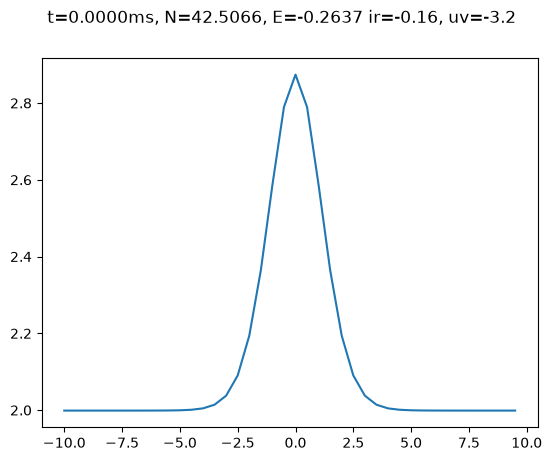
s = StateCPU()
s.minimize()
s.plot()
[<Axes: >]
s = StateCPU()
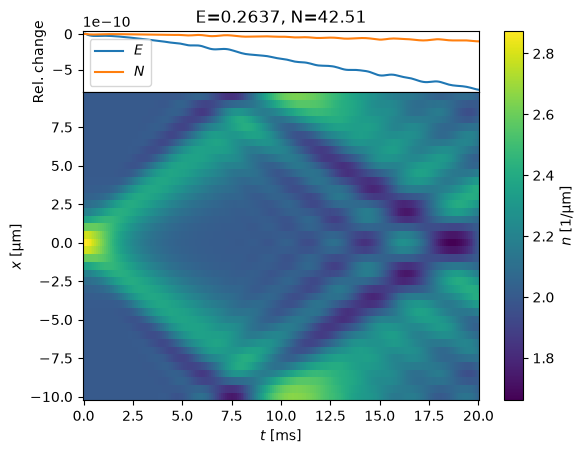
%time s.minimize()
%time evolve(s);
CPU times: user 102 ms, sys: 0 ns, total: 102 ms
Wall time: 51.7 ms
CPU times: user 4.32 s, sys: 10.4 ms, total: 4.33 s
Wall time: 2.71 s
Warning
The following GPU code will only run if you build this documentation on a gpu-enabled computer!
if gpe.gpu.cupy is None:
    print("No GPU support! Skipping")
else:
    s = StateGPU()
    %time s.minimize()
    %time evolve(s);
No GPU support! Skipping
In this particular code, the GPU code is about 4 times slower than the CPU code: 1D problems do not speed up very well.
Details#
In order to promote code reuse, we try not to write different code for CPU and GPU methods. To this end, special methods used in the core computation loop are carefully constructed to work on both CPU and GPU targets. With tools like cupy, this works quite well, but there are still some subtle points:
One needs to use the appropriate library –
np=numpyfor CPU code andcp=cupyfor GPU code. To do this, we provide a reference calledself.xpthat will point to the appropriate version. This needs to be initialized properly.GPU methods should generally return GPU arrays, but may be called by the user for plotting and analysis. In the latter case, the method should return a CPU array. Some mechanism needs to be used to indicate if the result should be left on the GPU or fetched to the CPU.
Some code inevitably must be specialized. Again, some mechanism is needed to signal which code is which.
The new strategy is to decorate GPU methods. These methods will have a boolean argument
accel allowing the method to customize the behaviour (if needed), and the decorator will
effect the necessary conversions if a GPU method is called from CPU code.
Limitations
The main limitation with this new strategy is that there is no easy way to dispatch on
attribute access: xyz must be replaced by get_xyz(accel=True).
Another issue is that now all core functions are decorated: this has two downsides:
Debugging becomes a real pain as we must now traverse through the decorators.
There is now a potential performance hit since we are using decorators.
A couple of comments:
Methods in the core evolution loop should always try to use accelerated code if possible. Thus, they should likely call
self.get_xyz(accel=True)rather thanself.get_xyz(accel=accel). The latter would trigger multiple attempted conversions of the data, which is probably not a problem, but if the data naturally sits on the GPU, then the internal calculations should be done there. The final result will be converted by the decorator.This provides some sort of check: if
get_xyz()is implemented without anaccelargument, then one will get an error.Private internal methods need not be decorated: they can just return the appropriate data in the appropriate place.
import functools


class GPUArray(np.ndarray):
    """Mock GPU array."""
    def __new__(cls, array):
        return super().__new__(
            cls, shape=array.shape, dtype=array.dtype, buffer=array)

    gpu = True

    def get(self):
        """Mock method to get the data from the GPU to the CPU."""
        return np.array(self)


def accel(f):
    functools.wraps(f)
    def wrapped_f(*v, **kw):
        accel = kw.get('accel', False)
        kw.update(accel=accel)
        res = f(*v, **kw)
        if not accel:
            res = res.get()
        return res
    return wrapped_f


class A:
    def __init__(self):
        self._xyz = GPUArray(np.linspace(0, 1))

    @accel
    def get_xyz(self, accel):
        return self._xyz

    @accel
    def get_V(self, accel):
        xyz = self.get_xyz(accel=True)
        x = xyz[0]
        return x**2


a = A()
print(a.get_xyz())
print(a.get_xyz(accel=True))
[0.         0.02040816 0.04081633 0.06122449 0.08163265 0.10204082
 0.12244898 0.14285714 0.16326531 0.18367347 0.20408163 0.2244898
 0.24489796 0.26530612 0.28571429 0.30612245 0.32653061 0.34693878
 0.36734694 0.3877551  0.40816327 0.42857143 0.44897959 0.46938776
 0.48979592 0.51020408 0.53061224 0.55102041 0.57142857 0.59183673
 0.6122449  0.63265306 0.65306122 0.67346939 0.69387755 0.71428571
 0.73469388 0.75510204 0.7755102  0.79591837 0.81632653 0.83673469
 0.85714286 0.87755102 0.89795918 0.91836735 0.93877551 0.95918367
 0.97959184 1.        ]
[0.         0.02040816 0.04081633 0.06122449 0.08163265 0.10204082
 0.12244898 0.14285714 0.16326531 0.18367347 0.20408163 0.2244898
 0.24489796 0.26530612 0.28571429 0.30612245 0.32653061 0.34693878
 0.36734694 0.3877551  0.40816327 0.42857143 0.44897959 0.46938776
 0.48979592 0.51020408 0.53061224 0.55102041 0.57142857 0.59183673
 0.6122449  0.63265306 0.65306122 0.67346939 0.69387755 0.71428571
 0.73469388 0.75510204 0.7755102  0.79591837 0.81632653 0.83673469
 0.85714286 0.87755102 0.89795918 0.91836735 0.93877551 0.95918367
 0.97959184 1.        ]
Old Strategy#
Our original strategy was to define “sundered” methods: these start and end with a
single underscore – e.g. _get_Vext_ – indicating that the method is needed in
the core computation loop, and should work on the GPU if available. These methods use
and return GPU arrays if used in that context.
For each of these methods, a matching unsundered method – e.g. get_Vext – is
defined which appropriately fetches and converts arrays from the GPU to the CPU.
The developer should define or modify only the sundered method (_get_Vext_): the
corresponding unsundered methods are defined on the fly by
gpe.utils.AsNumpyMixin which do the appropriate conversions. This class also
performs some checks, for example, raising exceptions if both sundered and unsundered
methods are defined (generally an error).
This sundering strategy allowed us to use attributes like _xyz_ (and the corresponding
CPU-based xyz).